
In today’s data‑driven world, the ability to transform unstructured text into machine‑readable, typed data is more valuable than ever. Whether you’re automating invoice processing, parsing customer letters, or feeding information into a workflow engine, the core challenge is turning prose into a schema‑constrained JSON payload that downstream systems can understand and validate.
Why Structured Output Is a Game Changer
When you ask a large language model to answer a question or explain something, you’ll almost always get a paragraph of prose. That output is generally useful, but it suffers from a few practical drawbacks for developers:
| Problem | Example | Impact |
|---|---|---|
| Non‑determinism | Same prompt, slightly different wording each run. | Hard to test, hard to parse automatically. |
| Parsing complexity | “The customer number is 123‑456.” | Requires regex or NLP to extract. |
| Schema drift | “Date: 2025‑12‑25” vs “25/12/2025” | Ambiguity, downstream validation fails. |
In contrast, a structured JSON payload is:
- Deterministic – a valid JSON string will look the same every time the same data is returned.
- Easily parsed –
System.Text.JsonorNewtonsoft.Jsoncan deserialize straight into a typed object. - Validatable – you can run a JSON schema validator or use C# compiler‑generated classes to ensure compliance.
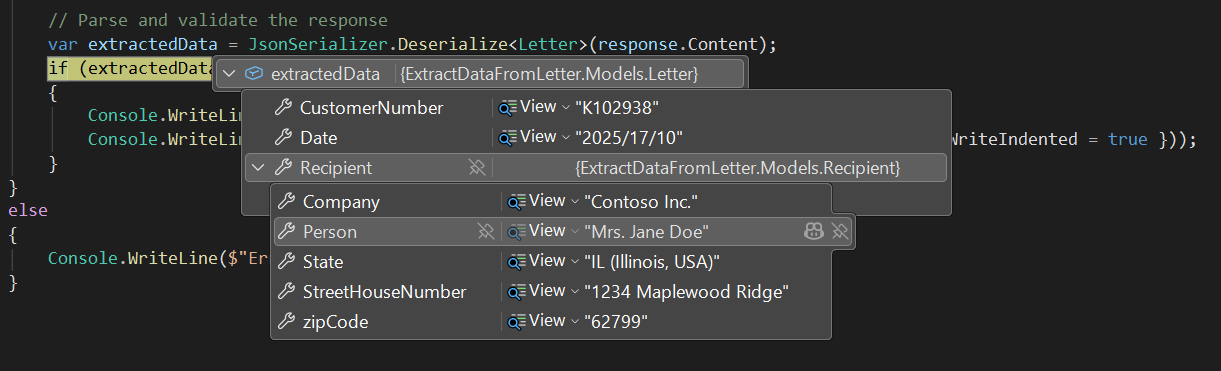
By forcing the LLM to conform to a schema, you effectively off‑load the “semantic correctness” part to the model while still keeping your own code strongly typed and testable. That’s the philosophy behind this application.
The Stack at a Glance
| Library | Purpose |
|---|---|
| OpenAI | Official .NET client that talks to any OpenAI‑compatible REST API (including Ollama). |
| NJsonSchema | Generates a JSON Schema from C# types, giving you type‑safe, compile‑time guarantees. |
| System.Text.Json | Built‑in JSON serializer/deserializer. |
The Domain Model
At the heart of the application is the Letter type – the structure we want the LLM to extract. The code defines two classes, Letter and Recipient:
using System.Text.Json.Serialization;
using Newtonsoft.Json;

namespace ExtractDataFromLetter.Models
{
    // "Master" class (for the letter data)
    [JsonObject(MemberSerialization.OptIn)]
    public class Letter
    {
        [JsonPropertyName("customerNumber")]
        [JsonProperty(Required = Required.Always)]
        public string CustomerNumber { get; set; }

        [JsonPropertyName("transactionId")]
        public string TransactionId { get; set; }

        [JsonPropertyName("dateOfLetter")]
        public string DateOfLetter { get; set; }

        [JsonPropertyName("recipient")]
        public Recipient Recipient { get; set; }

    // "Detail" class (for the recipient information)
    public class Recipient
    {
        [JsonPropertyName("company")]
        public string Company { get; set; }

        [JsonPropertyName("person")]
        public string Person { get; set; }

        [JsonPropertyName("streetHouseNumber")]
        public string StreetHouseNumber { get; set; }

        [JsonPropertyName("zipCode")]
        public string zipCode { get; set; }

        [JsonPropertyName("state")]
        public string State { get; set; }
    }
}
Why JsonObject(MemberSerialization.OptIn)?
MemberSerialization.OptIn tells the serializer to ignore any property that isn’t explicitly marked with JsonPropertyName. This prevents accidental leakage of private fields or additional data that you don’t want the LLM to output.
Strongly Typed Validation
The [JsonProperty(Required = Required.Always)] attribute on CustomerNumber ensures that the LLM must provide this field; otherwise deserialization will throw an exception, and the caller can treat that as a failure. This enforces data integrity early.
The letter itself
A simple .TXT file within the VS solution that will be copied to the bin folder.
Contoso Inc.
Customer Service Department
Ms. Jane Doe
1234 Maplewood Ridge
Springfield, IL 62799
USA
12/18/2025
Customer Nr: 102938Transaction Id: F-2025-0457
Dear Ms. Doe,
With reference to your inquiry dated December 16, 2025, we would like to inform you that
the item you ordered is expected to be shipped next week.
Once the item has been shipped, you will receive a separate notification including tracking information.
Please do not hesitate to contact us if you have any questions.
Kind regards,
Daniel Wilson
Global settings
A static class that provides all the configuration that we need.
namespace ExtractDataFromLetter
{
    /// <summary>
    /// Provides global constants for OpenAI API configuration, file paths, and prompt templates
    /// used throughout the application.
    /// </summary>
    public static class Globals
    {
        // ******************* OPEN AI API credentials **********************
        public const string OPEN_AI_ENDPOINT = "http://127.0.0.1:11434/v1";
        public const string OPEN_AI_MODEL = "devstral-small-2:24b";
        public const string OPEN_AI_API_KEY = "not-needed-for-local-ollama";

        // ******************* LLM parameters ****************************
        public const float LLM_TEMPERATURE = 0.2f;

        // ******************* Path to text file ****************************
        public const string LETTER_FILE_PATH = "letter.txt";

        // ******************* Prompts ****************************
        public const string PROMPT_SYSTEM = @"You are a precise data extraction assistant specialized in processing letters. Your task is to extract ALL requested fields from the letter content.";
        public const string PROMPT_USER = "Extract all the requested data from this letter: {0}";
    }
}
The OpenAiClient Wrapper
The application ships with a small helper class that abstracts away the boilerplate of setting up a chat completion request with a schema, including two helper DTOs for the LLM response. Here’s the key method:
using System.ClientModel;
using OpenAI;
using OpenAI.Chat;

namespace ExtractDataFromLetter.Services
{
    public class StructuredResponse
    {
        public bool Successful { get; set; }
        public string Content { get; set; }
        public ErrorResponse Error { get; set; }
    }

    public class ErrorResponse
    {
        public string Message { get; set; }
    }

    /// <summary>
    /// Provides a client for interacting with OpenAI-compatible REST APIs, enabling structured chat completions using
    /// custom JSON schemas.
    /// </summary>
    public class OpenAiClient
    {
        private readonly OpenAIClient _client;

        public OpenAiClient()
        {
            _client = new OpenAIClient(
                new ApiKeyCredential(Globals.OPEN_AI_API_KEY),
                new OpenAIClientOptions
                {
                    Endpoint = new Uri(Globals.OPEN_AI_ENDPOINT),
                }
            );
        }

        /// <summary>
        /// Generates a structured response from a large language model (LLM) using the specified chat messages and a provided
        /// JSON schema for output formatting.
        /// </summary>
        public async Task<StructuredResponse> GetStructuredResponseAsync(
            IEnumerable<ChatMessage> chatMessages,
            BinaryData jsonSchema)
        {
            try
            {
                ChatCompletionOptions options = new()
                {
                    ResponseFormat = ChatResponseFormat.CreateJsonSchemaFormat(
                        jsonSchemaFormatName: "extracting",
                        jsonSchema: jsonSchema,
                        jsonSchemaIsStrict: true),
                    Temperature = Globals.LLM_TEMPERATURE,
                };

                var chatClient = _client.GetChatClient(Globals.OPEN_AI_MODEL);
                ChatCompletion completion = await chatClient.CompleteChatAsync(chatMessages, options);

                return new StructuredResponse
                {
                    Successful = true,
                    Content = completion.Content[0].Text
                };
            }
            catch (Exception ex)
            {
                return new StructuredResponse
                {
                    Successful = false,
                    Error = new ErrorResponse { Message = ex.Message }
                };
            }
        }
    }
}
What’s Going On?
| Step | Description |
|---|---|
| Create `ChatCompletionOptions` | Configures the request to return JSON that matches the schema ResponseFormat. Setting jsonSchemaIsStrict: true forces the model to refuse outputs that violate the schema. |
| Set `Temperature` | Controls the randomness of the model. A low temperature (e.g., 0.2) yields more deterministic output, which is ideal for data extraction. |
| Call `CompleteChatAsync` | Sends the messages plus the schema to the LLM. The model will output a JSON string that passes validation. |
| Error handling | Wraps everything in a try/catch so the application never crashes on a bad response; instead, it returns a StructuredResponse with Successful = false. |
The Program.cs Flow
Let’s walk through the main entry point, highlighting how all the pieces fit together.
using System.Text.Json;
using ExtractDataFromLetter.Models;
using ExtractDataFromLetter.Services;
using NJsonSchema;
using OpenAI.Chat;

namespace ExtractDataFromLetter
{
    /// <summary>
    /// Provides the entry point for the application, orchestrating the extraction of structured data
    /// from a letter using a large language model.
    /// </summary>
    class Program
    {
        static async Task Main(string[] args)
        {
            // Read letter text from provided file
            string letterContent;
            try
            {
                letterContent = File.ReadAllText(Globals.LETTER_FILE_PATH);
                Console.WriteLine($"Successfully read letter from {Globals.LETTER_FILE_PATH}");
            }
            catch (Exception ex)
            {
                Console.WriteLine($"Error reading letter file: {ex.Message}");
                return;
            }

            var openAiClient = new OpenAiClient();

            // Prepare system & user prompts
            List<ChatMessage> chatMessages =
            [
                new SystemChatMessage(Globals.PROMPT_SYSTEM),
                new UserChatMessage(string.Format(Globals.PROMPT_USER, letterContent))
            ];

            // Use NJsonSchema to generate the JSON schema from the Letter type
            //   (=the structure we want to extract from the letter)
            BinaryData schema = BinaryData.FromString(JsonSchema.FromType<Letter>().ToJson());

            var response = await openAiClient.GetStructuredResponseAsync(
                chatMessages,
                schema
            );

            if (response.Successful)
            {
                // Output the raw response text
                Console.WriteLine("\nExtracted data from LLM:");
                Console.WriteLine(response.Content);

                // Parse, validate and output the structured response
                var extractedData = JsonSerializer.Deserialize<Letter>(response.Content);
                if (extractedData != null)
                {
                    Console.WriteLine("\nValidated data:");
                    Console.WriteLine(JsonSerializer.Serialize(extractedData,
                        new JsonSerializerOptions { WriteIndented = true }));
                }
            }
            else
            {
                Console.WriteLine($"Error: {response.Error?.Message}");
            }
        }
    }
}
Building a JSON Schema with NJsonSchema
You might wonder: why not just hand a raw JSON string as the schema? That works, but you lose compile‑time safety. If you misspell a property name or change the C# model, your code compiles but the schema no longer matches the type, causing subtle bugs.
NJsonSchema solves this by generating a JSON Schema directly from the C# type:
BinaryData schema = BinaryData.FromString(JsonSchema.FromType<Letter>().ToJson());
Let’s unpack the call chain:
-
JsonSchema.FromType<Letter>()
Uses reflection to walk theLettertype, its properties, and their attributes. The result is aJsonSchemaobject that contains all the metadata required to validate an instance. -
.ToJson()
Serializes the schema object into a JSON string that follows the official JSON Schema draft. This string is what the OpenAI API expects. -
BinaryData.FromString(...)
TheOpenAISDK expects aBinaryDatapayload for thejsonSchemaparameter.BinaryDatais essentially a wrapper around raw bytes, making the code platform‑agnostic.
Because the schema comes from the same type you’ll later deserialize into, you can be confident that the model’s output will match your expectations and that your deserialization will succeed.
Reducing the Risk of Hallucinations
This way we reduce the chance of hallucinated data. The ResponseFormat option enforces the JSON structure even if the model tries to deviate.
But nevertheless, setting the right temperature is important. When we set the temperature to 0.2 we will get this output:
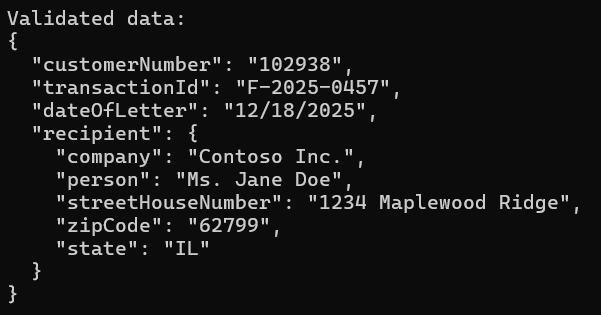
Inspect the state property - with a low temperature the LLM simple graps "IL" for the state from the text without any further processing.
Now let's increase the temperature to 0.9 and we get:
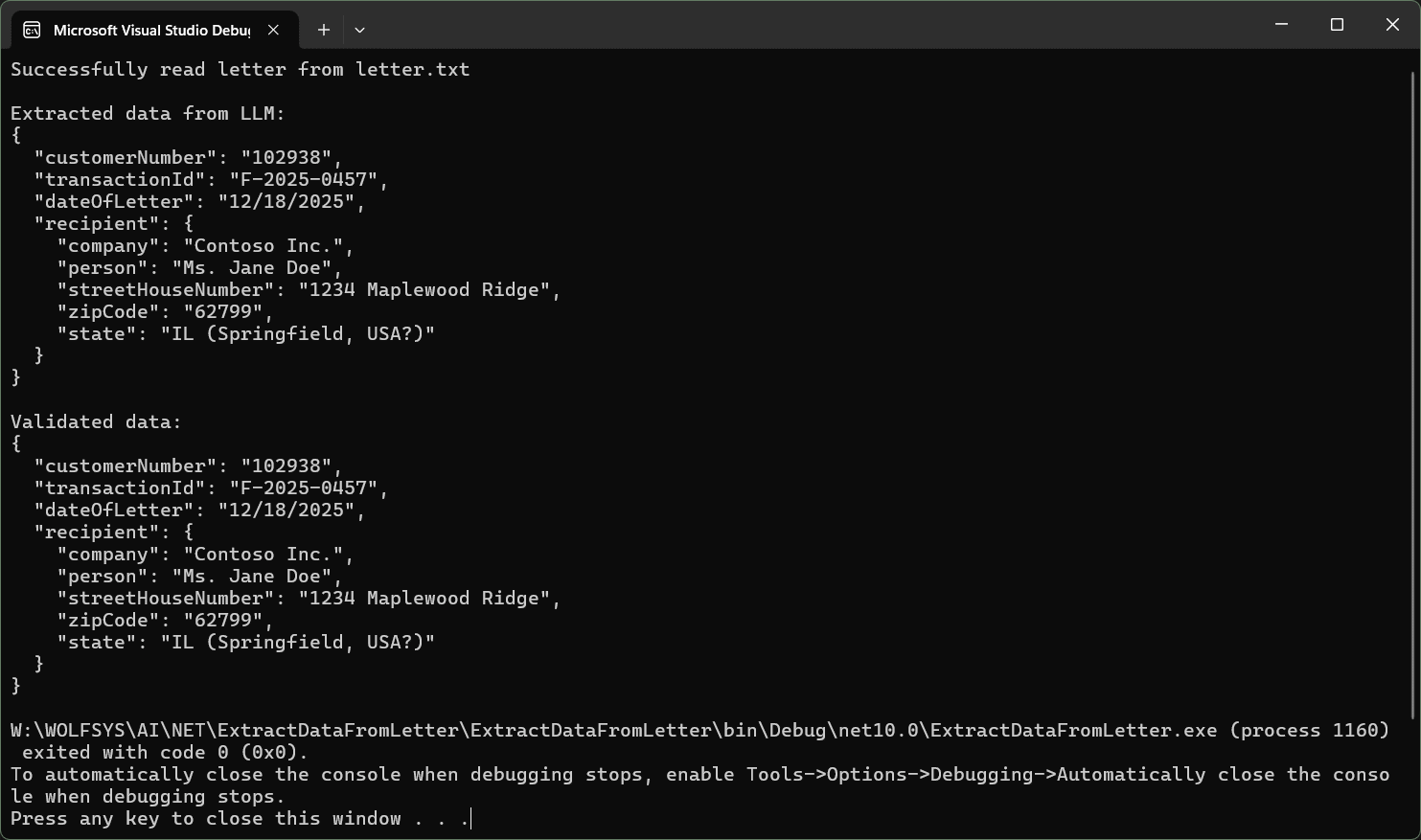
As you see, now the LLM gets creative and adds "Springfield, USA" to "IL". But since this is an educated guess, the LLM also tells us this and adds a questionmark.
So be shure to set the right temperature. Stick to 0.0 – 0.3 for extraction tasks.
Download
You can download the source code here.
Take‑away Summary
- Structured output is the most reliable way to turn LLM prose into consumable data.
- Using
NJsonSchemato generate a schema from your C# model guarantees type safety and eliminates manual schema maintenance. - The OpenAI SDK lets you enforce a strict JSON schema via
ResponseFormat, making the LLM output deterministic. - The application’s design like clear prompts, a thin wrapper around the client, and robust error handling, makes it easy to extend, test, and adapt to different LLM providers, including local Ollama instances.
If you’re building any system that needs to extract data from natural language, give this pattern a try. It marries the power of modern LLMs with the rigor of typed C# code, giving you the best of both worlds.